Developer Portfolio
Overview
This project is a terminal-inspired developer portfolio built with React and Vite. It lets visitors type or click commands to browse projects, experience, education, resume, and CV content with the same feel as a CLI. All sections are data-driven so content updates are quick and low-friction.
UX & Interaction
- Command-style navigation with history (Up/Down) and sidebar shortcuts that emit the same commands
- Consistent output layout for projects and experience, including status labels and tech stacks
- Keyboard-friendly focus flow and smooth scrolling for in-page anchors
- Cover letter and resume viewers for quick sharing
Architecture
- React + Vite single-page app
- Command parsing and routing handled in
parseArgsandhandleCommand - Markdown-backed project pages rendered with
markedand TOC generation for headings - Content stored in JSON under
src/data/(experience, education, projects, skills, cover letter) - Terminal event bus fallback using
CustomEventfor components that need to trigger commands
Notable Features
viewcommand set with filters: by status/tag/name for projects, by company/position/years for experience- Project statuses normalized through a shared status model for consistent coloring
- Scroll spy + manual anchor locking for project markdown pages
- Responsive layout that keeps the terminal aesthetic on desktop and mobile
Testing & Deployment Workflow
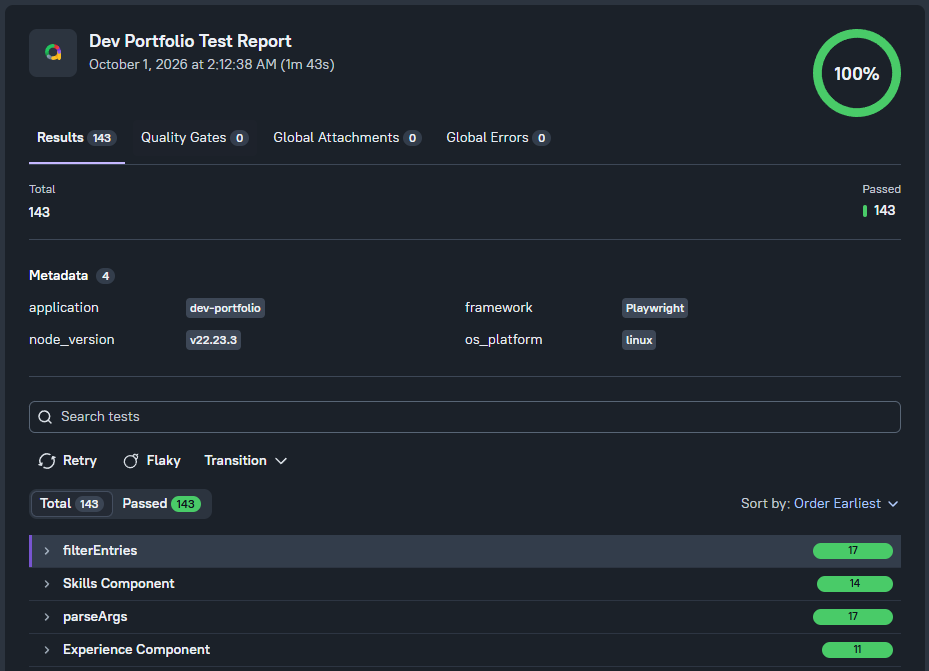
This portfolio is deployed with an automated quality workflow that validates the site after each release. The same project is backed by automated checks across the stack:
- Vitest checks command parsing, filtering logic, and content behaviors
- Playwright exercises the browser experience end to end
- Allure combines both suites into a single, shareable report
The dashboard makes it easy to see passing and failing trends, flaky areas, and the overall health of the application without digging through raw logs. It also shows how the app is validated from the UI through the browser layer and into the supporting automation infrastructure.
- CI pipeline runs linting, build checks, Vitest, and Playwright on pull requests and main branch updates
- Allure stores historical results and merges suite data into one report
- GitHub Pages deployment publishes the latest dashboard for main branch builds
- Results are structured to support fast debugging and easier stakeholder visibility
Tooling & Stack
- React, Vite, and modern JSX tooling
markedwith GitHub-style heading IDs for reliable anchor links- CSS modules that theme the terminal look and panel layout
- Vite glob imports for project markdown so new writeups are auto-discovered
- Quality automation with Vitest, Playwright, and Allure
Next Steps
- Add more project writeups with screenshots
- Expand command shortcuts for common filters (e.g., featured projects)
- Integrate light/dark theming toggle while preserving the terminal vibe
- Continue refining the live results experience and report storytelling